





Fair price


AI listing checker · iPhone, Android and web
Check any listing
from your phone.
Share a listing straight from the marketplace app. In under a minute you’ll know if the price is fair, what looks off in the photos and what to ask the seller.





Works with listings from
Your report in under a minute
Overpriced? Sketchy? Know before you reply.
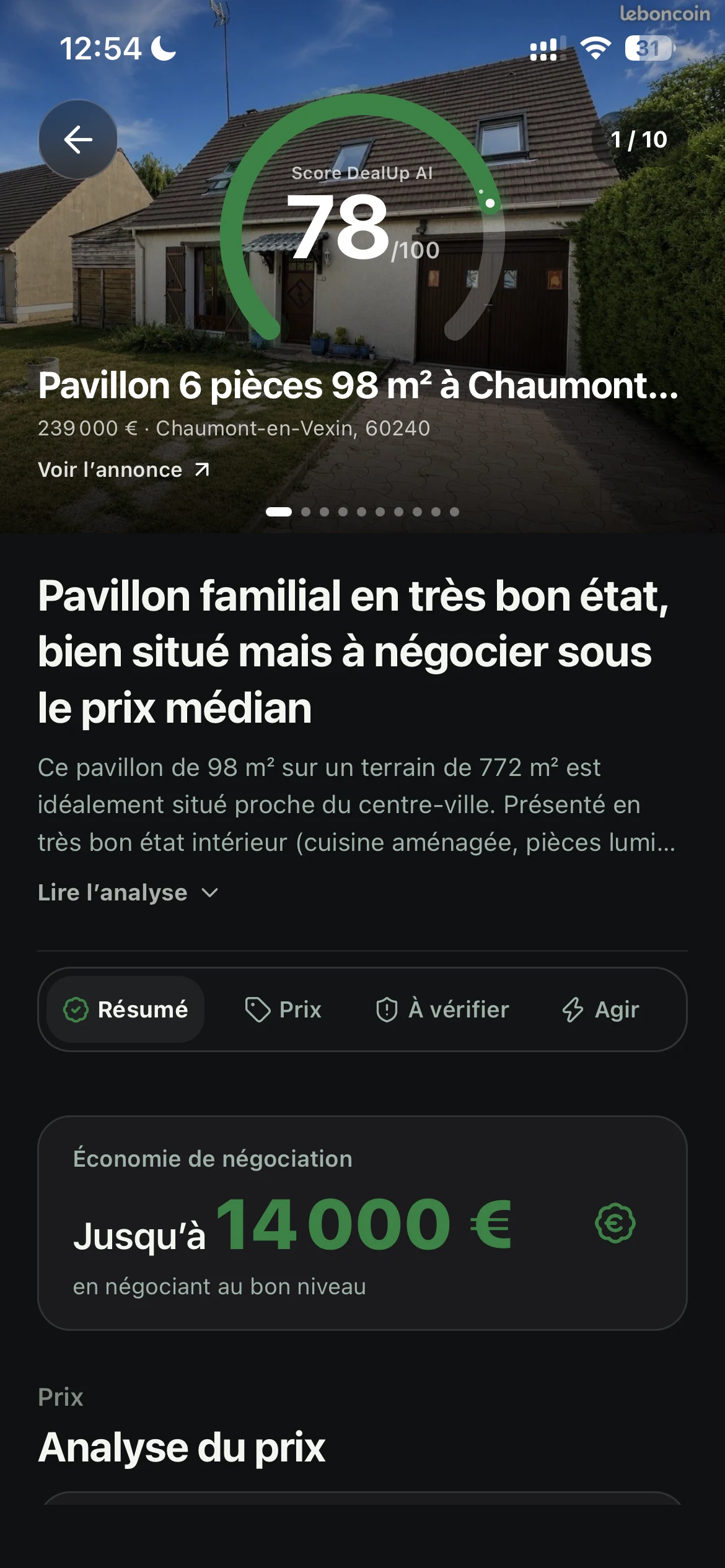
DealUp AI turns one listing into a clear call: what it’s worth, what looks off and exactly what to ask before you pay.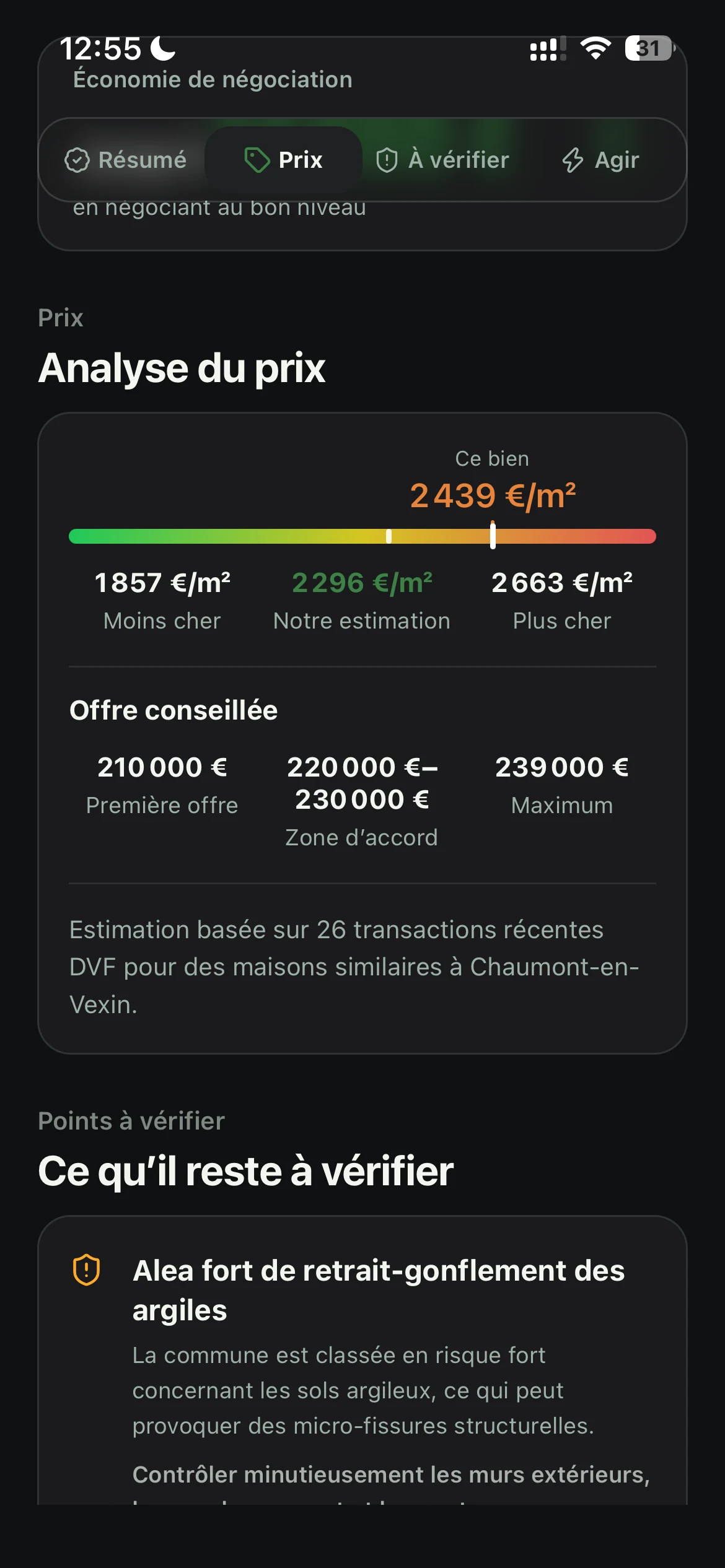

What you get
Everything you’d ask a friend who knows cars, or houses.
Car, house, watch or phone: DealUp AI reads the listing like a seasoned buyer, then tells you what to pay, what to check and what to say to the seller.Photo check
Red flags in the photos.
The AI reviews the listing photos and any the seller sends you: visible wear, details that don’t match the description, missing parts.Negotiation
An offer you can back up.
An opening offer, a target range and a ready-to-send message built on what the listing shows. You decide whether to send it.Checklist
Your test drive and showing checklist.
Questions for the seller and what to check in person: before you meet, during the test drive or showing, and before you pay.How it works
From the listing to the showing.
No spreadsheets, no ten open tabs of comps. One link in, one clear answer out.- 01Share or paste the link
From the marketplace app, a property portal or your browser: no screenshots needed.
- 02Read your report
A score out of 100, a verdict, the fair price in USD and what still needs checking, in a clear order.
- 03Use the checklist in person
Take the checks into your showing, test drive or inspection and tick them off before you pay.
FAQ
Questions before your first check.
What DealUp AI checks, what it can’t, and which listings work.What is DealUp AI?
DealUp AI is an AI app for iPhone, Android and the web that checks a used car, real estate or second-hand listing before you buy. Paste the link: it estimates the fair price from comparable listings, reviews the photos for red flags, scores the deal out of 100 with a verdict, and writes your offer message and inspection checklist.
How does DealUp AI work?
Copy the listing link and paste it here or in the app. DealUp AI builds a report for that exact listing: fair price, red flags, questions for the seller and a checklist.
Which sites does it work with?
Zillow, Realtor.com, CarGurus and Facebook Marketplace. If a link isn’t supported yet, you’ll know as soon as you paste it.
Can it spot a Facebook Marketplace scam?
It flags the warning signs it can see: a price far below market, photos that don’t match the description, missing details or a push to pay before you meet. It can’t confirm who the seller is, so treat every flag as a reason to ask questions, not as proof.
Is the price the same as a KBB value or a Zestimate?
No. DealUp AI compares the asking price with similar private-party listings and explains the range it lands on. It’s a reference for your offer, not an appraisal.
What can I check?
Used cars, homes, electronics, watches, clothing and sneakers, appliances, and pretty much anything else sold used.
Does DealUp AI guarantee the deal?
No. It’s a second opinion that shows what still needs checking. It never certifies condition, authenticity or the seller’s identity.
Does DealUp AI check the listing photos?
Yes. It reviews the listing photos and any the seller sends you: visible wear, details that don’t match the description, missing parts. A photo is a clue, not proof: the report never certifies actual condition or authenticity.
Does DealUp AI write the message to the seller?
Yes. The report suggests an opening offer, a target range and a ready-to-send message based on the market and what it found. You edit and send it yourself. For a rental, the message asks for a showing and never negotiates the rent.
Found a listing? Take the plan with you.
Get DealUp AI for iPhone and Android.